Getting Started
Installation
Install memsearch with pip (OpenAI embeddings are included by default):
Extras for additional embedding providers
Each optional extra pulls in the provider SDK you need:
$ pip install "memsearch[onnx]"        # ONNX Runtime — bge-m3 int8, CPU, no API key
$ pip install "memsearch[google]"      # Google Gemini embeddings
$ pip install "memsearch[voyage]"      # Voyage AI embeddings
$ pip install "memsearch[ollama]"      # Ollama (local, no API key)
$ pip install "memsearch[local]"       # sentence-transformers (local, no API key)
$ pip install "memsearch[anthropic]"   # Anthropic (for compact/summarization LLM)
$ pip install "memsearch[all]"         # Everything above
How It All Fits Together
The diagram below shows the full lifecycle: writing markdown, indexing chunks, and searching them later.
sequenceDiagram
    participant U as Your App
    participant M as MemSearch
    participant E as Embedding API
    participant V as Milvus

    U->>M: save_memory("Redis config...")
    U->>M: mem.index()
    M->>M: Chunk markdown
    M->>M: SHA-256 dedup
    M->>E: Embed new chunks
    E-->>M: Vectors
    M->>V: Upsert
    U->>M: mem.search("Redis?")
    M->>E: Embed query
    E-->>M: Query vector
    M->>V: Hybrid search (dense + BM25)
    V-->>M: RRF-reranked Top-K matches
    M-->>U: Results with source info
Markdown is the source of truth. The vector store is a derived index -- rebuildable anytime from the original .md files. This means your memory is human-readable, git-friendly, and never locked into a proprietary format.
Your First Memory Search
This section walks through the complete flow: create a memory directory, write some markdown files, index them, and search.
Set up your memory directory
memsearch follows the OpenClaw memory layout: a MEMORY.md file for persistent facts, plus daily logs in a memory/ subdirectory.
Write a MEMORY.md with long-lived facts:
$ cat > MEMORY.md << 'EOF'
# MEMORY.md

## Team
- Alice: frontend lead, React expert
- Bob: backend lead, Python/FastAPI
- Charlie: DevOps, manages Kubernetes

## Architecture Decisions
- ADR-001: Use event-driven architecture with Kafka
- ADR-002: PostgreSQL 16 as primary database
- ADR-003: Redis 7 for caching and sessions
- ADR-004: Milvus for product semantic search
EOF
Write a daily log:
$ cat > memory/2026-02-10.md << 'EOF'
# 2026-02-10

## Standup Notes
- Alice finished the checkout redesign, merging today
- Bob fixed the N+1 query in the order service — response time dropped from 800ms to 120ms
- Charlie set up staging auto-deploy via GitHub Actions

## Decision
We decided to migrate from REST to gRPC for inter-service communication.
The main drivers: type safety, streaming support, and ~40% latency reduction in benchmarks.
EOF
Index with the CLI
Search with the CLI
$ memsearch search "what caching solution are we using?"
--- Result 1 (score: 0.0332) ---
Source: MEMORY.md
Heading: Architecture Decisions
- ADR-003: Redis 7 for caching and sessions

$ memsearch search "what did Bob work on recently?" --top-k 3
--- Result 1 (score: 0.0328) ---
Source: memory/2026-02-10.md
Heading: Standup Notes
- Bob fixed the N+1 query in the order service — response time dropped from 800ms to 120ms
Use --json-output to get structured results for piping into other tools:
Search with the Python API
The same workflow in Python:
import asyncio
from memsearch import MemSearch

async def main():
    mem = MemSearch(paths=["."])
    await mem.index()

    results = await mem.search("what caching solution are we using?", top_k=3)
    for r in results:
        print(f"[{r['score']:.4f}] {r['source']} — {r['heading']}")
        print(f"  {r['content'][:200]}\n")

    mem.close()

asyncio.run(main())
Building an Agent with Memory
The real power of memsearch is giving an LLM agent persistent memory across conversations. The pattern is simple: recall, think, remember.
- Recall -- search past memories for context relevant to the user's question
- Think -- call the LLM with that context injected into the system prompt
- Remember -- save the exchange to a daily markdown log and re-index
OpenAI example (default)
import asyncio
from datetime import date
from pathlib import Path
from openai import OpenAI
from memsearch import MemSearch

MEMORY_DIR = "./memory"
llm = OpenAI()
mem = MemSearch(paths=[MEMORY_DIR])


def save_memory(content: str):
    """Append a note to today's memory log (OpenClaw-style daily markdown)."""
    p = Path(MEMORY_DIR) / f"{date.today()}.md"
    p.parent.mkdir(parents=True, exist_ok=True)
    with open(p, "a") as f:
        if p.stat().st_size == 0:
            f.write(f"# {date.today()}\n")
        f.write(f"\n{content}\n")


async def agent_chat(user_input: str) -> str:
    # 1. Recall — search past memories for relevant context
    memories = await mem.search(user_input, top_k=5)
    context = "\n".join(f"- {m['content'][:300]}" for m in memories)

    # 2. Think — call LLM with memory context
    resp = llm.chat.completions.create(
        model="gpt-4o-mini",
        messages=[
            {
                "role": "system",
                "content": (
                    "You are a helpful assistant with access to the user's memory.\n"
                    f"Relevant memories:\n{context}"
                ),
            },
            {"role": "user", "content": user_input},
        ],
    )
    answer = resp.choices[0].message.content

    # 3. Remember — save this exchange and re-index
    save_memory(f"## User: {user_input}\n\n{answer}")
    await mem.index()

    return answer


async def main():
    # Seed some knowledge
    save_memory("## Team\n- Alice: frontend lead\n- Bob: backend lead")
    save_memory("## Decision\nWe chose Redis for caching over Memcached.")
    await mem.index()

    # Agent can now recall those memories
    print(await agent_chat("Who is our frontend lead?"))
    print(await agent_chat("What caching solution did we pick?"))


asyncio.run(main())
Anthropic Claude variant
Install the Anthropic extra:
Then swap the LLM call:
from anthropic import Anthropic

llm = Anthropic()

# In agent_chat(), replace the OpenAI call with:
resp = llm.messages.create(
    model="claude-sonnet-4-5-20250929",
    max_tokens=1024,
    system=f"You have these memories:\n{context}",
    messages=[{"role": "user", "content": user_input}],
)
answer = resp.content[0].text
Ollama variant (fully local, no API key)
$ pip install "memsearch[ollama]"
$ ollama pull nomic-embed-text    # embedding model
$ ollama pull llama3.2            # chat model
from ollama import chat
from memsearch import MemSearch

# Use Ollama for embeddings too — everything stays local
mem = MemSearch(paths=[MEMORY_DIR], embedding_provider="ollama")

# In agent_chat(), replace the LLM call with:
resp = chat(
    model="llama3.2",
    messages=[
        {"role": "system", "content": f"You have these memories:\n{context}"},
        {"role": "user", "content": user_input},
    ],
)
answer = resp.message.content
API Keys
Set the environment variable for your chosen embedding provider. memsearch reads standard SDK environment variables -- no custom key names.
| Provider | Env Var | Notes |
|---|---|---|
| OpenAI (default) | OPENAI_API_KEY |
Included with base install |
| ONNX (ccplugin default) | -- | No API key needed. CPU-only, bge-m3 int8. Requires memsearch[onnx] |
| OpenAI-compatible proxy | OPENAI_BASE_URL |
For Azure OpenAI, vLLM, LiteLLM, etc. |
| Google Gemini | GOOGLE_API_KEY |
Requires memsearch[google] |
| Voyage AI | VOYAGE_API_KEY |
Requires memsearch[voyage] |
| Ollama | OLLAMA_HOST (optional) |
Defaults to http://localhost:11434 |
| Local (sentence-transformers) | -- | No API key needed |
| Anthropic | ANTHROPIC_API_KEY |
Used by compact summarization only |
$ export OPENAI_API_KEY="sk-..."         # OpenAI embeddings (default)
$ export GOOGLE_API_KEY="..."            # Google Gemini embeddings
$ export VOYAGE_API_KEY="..."            # Voyage AI embeddings
$ export ANTHROPIC_API_KEY="..."         # Anthropic (for compact summarization)
Milvus Backends
memsearch works with three Milvus deployment modes. Choose based on your needs:
graph TD
    A[memsearch] --> B{Choose backend}
    B -->|"Default<br>(zero config)"| C["Milvus Lite<br>~/.memsearch/milvus.db"]
    B -->|"Self-hosted<br>(multi-agent)"| D["Milvus Server<br>localhost:19530"]
    B -->|"Managed<br>(production)"| E["Zilliz Cloud<br>cloud.zilliz.com"]

    style C fill:#2a3a5c,stroke:#6ba3d6,color:#a8b2c1
    style D fill:#2a3a5c,stroke:#6ba3d6,color:#a8b2c1
    style E fill:#2a3a5c,stroke:#e0976b,color:#a8b2c1
Milvus Lite (default -- zero config)
Data is stored in a single local .db file. No server to install, no ports to open.
Best for: personal use, single-agent setups, prototyping, development.
Windows not supported
Milvus Lite does not provide Windows binaries (milvus-lite#176). On Windows, use Milvus Server (Docker) or Zilliz Cloud instead. Alternatively, run memsearch inside WSL2.
Milvus Server (self-hosted)
Deploy Milvus via Docker or Kubernetes. Multiple agents and users can share the same server instance, each using a separate collection or database.
Best for: team environments, multi-agent workloads, shared always-on vector store.
Zilliz Cloud (fully managed)  Recommended
Zero-ops, auto-scaling managed Milvus. Get a free cluster →
Best for: production deployments, teams that do not want to manage infrastructure, anyone who wants real-time indexing without running Docker.
Sign up for a free Zilliz Cloud cluster 👈
You can sign up on Zilliz Cloud to get a free cluster and API key.
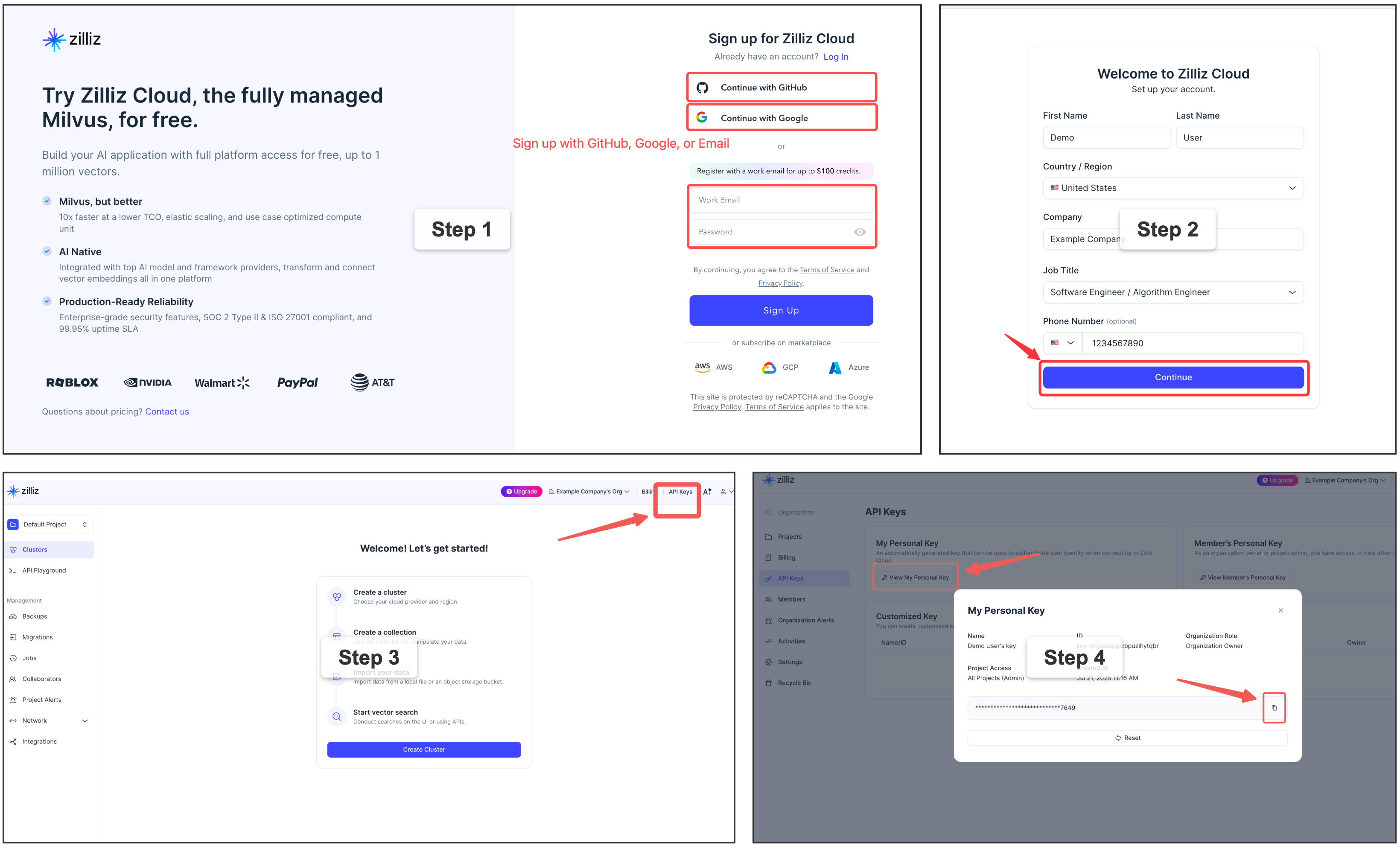
Copy your Personal Key to use as milvus_token in the examples below.
Why Zilliz Cloud?
Zilliz Cloud removes all the operational overhead of running Milvus yourself — no Docker, no port management, no upgrades, no backup scripts. You get a production-ready endpoint in under 2 minutes, with a generous free tier that covers most personal and small-team use cases.
Which backend should I choose?
| Milvus Lite | Milvus Server | Zilliz Cloud | |
|---|---|---|---|
| Setup complexity | Zero config | Docker required | Zero config |
| Concurrent access | |||
Real-time watch indexing |
|||
| Multi-machine / team sharing | Manual networking | Built-in | |
| Ops burden | None | Self-managed | Fully managed |
| Auto-scaling | Manual | Automatic | |
| Free tier | Unlimited (local) | Self-hosted cost | Free cluster |
graph TD
    Q1{"Just trying memsearch<br>or single-user dev?"}
    Q1 -->|Yes| LITE["✅ Milvus Lite<br>(default, zero config)"]
    Q1 -->|No| Q2{"Want to manage<br>your own server?"}
    Q2 -->|Yes| SERVER["✅ Milvus Server<br>(Docker / K8s)"]
    Q2 -->|No| CLOUD["⭐ Zilliz Cloud<br>(recommended)"]

    style CLOUD fill:#1a5276,stroke:#e0976b,color:#f0f0f0
    style LITE fill:#2a3a5c,stroke:#6ba3d6,color:#a8b2c1
    style SERVER fill:#2a3a5c,stroke:#6ba3d6,color:#a8b2c1
Upgrade anytime
Starting with Milvus Lite? You can switch to Zilliz Cloud later by changing a single config value — your data will be re-indexed automatically from the source markdown files.
Configuration
memsearch uses a layered configuration system. Settings are resolved in priority order (lowest to highest):
- Built-in defaults -- sensible out-of-the-box values
- Global config --
~/.memsearch/config.toml - Project config --
.memsearch.tomlin your working directory - CLI flags --
--milvus-uri,--provider, etc.
Higher-priority sources override lower ones. This means you can set defaults globally, customize per project, and override on the fly with CLI flags.
Note: API keys can be configured via environment variables (e.g.
OPENAI_API_KEY) or in config files using theenv:reference syntax (e.g.api_key = "env:MY_API_KEY"). See API Keys and Environment Variable References below.
Interactive config wizard
The fastest way to configure memsearch:
$ memsearch config init
memsearch configuration wizard
Writing to: /home/user/.memsearch/config.toml

── Milvus ──
  Milvus URI [~/.memsearch/milvus.db]:
  Milvus token (empty for none) []:
  Collection name [memsearch_chunks]:

── Embedding ──
  Provider (openai/google/voyage/ollama/local) [openai]:
  Model (empty for provider default) []:

── Chunking ──
  Max chunk size (chars) [1500]:
  Overlap lines [2]:
...

Config saved to /home/user/.memsearch/config.toml
Use --project to write to .memsearch.toml in the current directory instead:
Config file locations
| Scope | Path | Use case |
|---|---|---|
| Global | ~/.memsearch/config.toml |
Machine-wide defaults (Milvus URI, preferred provider) |
| Project | .memsearch.toml |
Per-project overrides (collection name, custom model) |
Both files use TOML format:
# Example ~/.memsearch/config.toml

[milvus]
uri = "http://localhost:19530"
token = "root:Milvus"
collection = "memsearch_chunks"

[embedding]
provider = "openai"
model = ""
base_url = ""
api_key = ""

[chunking]
max_chunk_size = 1500
overlap_lines = 2

[watch]
debounce_ms = 1500

[compact]
llm_provider = "openai"
llm_model = ""
prompt_file = ""
Environment variable references
Any string value in the config file can reference an environment variable using the env: prefix. This lets you keep secrets out of config files while still configuring them per-project:
# .memsearch.toml
[embedding]
provider = "openai"
base_url = "https://my-azure.openai.azure.com"
api_key = "env:AZURE_OPENAI_API_KEY"       # resolved from $AZURE_OPENAI_API_KEY at runtime

[milvus]
token = "env:MILVUS_TOKEN"                 # works for any string field
If the referenced environment variable is not set, memsearch raises an error at startup with a clear message. Plain string values (without the env: prefix) are used as-is.
Custom OpenAI-compatible endpoints
The embedding.base_url and embedding.api_key fields allow using any OpenAI-compatible embedding API (Azure OpenAI, vLLM, LiteLLM, SiliconFlow, NVIDIA, etc.):
# .memsearch.toml — Azure OpenAI example
[embedding]
provider = "openai"
model = "text-embedding-3-small"
base_url = "https://my-resource.openai.azure.com"
api_key = "env:AZURE_OPENAI_API_KEY"
# .memsearch.toml — local vLLM example
[embedding]
provider = "openai"
model = "BAAI/bge-small-en-v1.5"
base_url = "http://localhost:8000/v1"
api_key = "dummy"
These settings can also be passed via CLI flags (--base-url, --api-key) or the Python API (embedding_base_url, embedding_api_key).
Get and set individual values
$ memsearch config set milvus.uri http://localhost:19530
Set milvus.uri = http://localhost:19530 in /home/user/.memsearch/config.toml

$ memsearch config get milvus.uri
http://localhost:19530

$ memsearch config set embedding.provider ollama --project
Set embedding.provider = ollama in .memsearch.toml
View resolved configuration
$ memsearch config list --resolved    # Final merged config from all sources
$ memsearch config list --global      # Show ~/.memsearch/config.toml only
$ memsearch config list --project     # Show .memsearch.toml only
CLI flag overrides
CLI flags always take the highest priority:
$ memsearch index ./memory/ --provider google --milvus-uri http://localhost:19530
$ memsearch search "Redis config" --top-k 10 --milvus-uri http://10.0.0.5:19530
What's Next
- Architecture -- deep dive into the chunking pipeline, dedup strategy, and data flow diagrams
- CLI Reference -- complete reference for all
memsearchcommands, flags, and options - Claude Code Plugin -- give Claude automatic persistent memory across sessions with zero configuration