Configuration
memsearch uses a layered TOML config system. Most users don't need to configure anything — the defaults work out of the box.
Config Locations (priority low → high)
~/.memsearch/config.toml— global defaults<project>/.memsearch.toml— project-level overrides- CLI flags — highest priority
Quick Setup
# Interactive config wizard
memsearch config init

# Or set individual values
memsearch config set embedding.provider onnx
memsearch config set milvus.uri http://localhost:19530
Embedding Provider
| Provider | Install | API Key | Notes |
|---|---|---|---|
| onnx (default) | pip install memsearch[onnx] |
No | Local, free, ~100MB model download |
| openai | pip install memsearch[openai] |
OPENAI_API_KEY |
Best quality |
pip install memsearch[google] |
GOOGLE_API_KEY |
Gemini embeddings | |
| voyage | pip install memsearch[voyage] |
VOYAGE_API_KEY |
High quality |
| ollama | pip install memsearch[ollama] |
No | Local, any model |
# Switch provider
memsearch config set embedding.provider openai
memsearch index --force   # re-index with new provider
Milvus Backend
| Backend | Config | Notes |
|---|---|---|
| Milvus Lite (default) — zero config, single file. Great for getting started: |
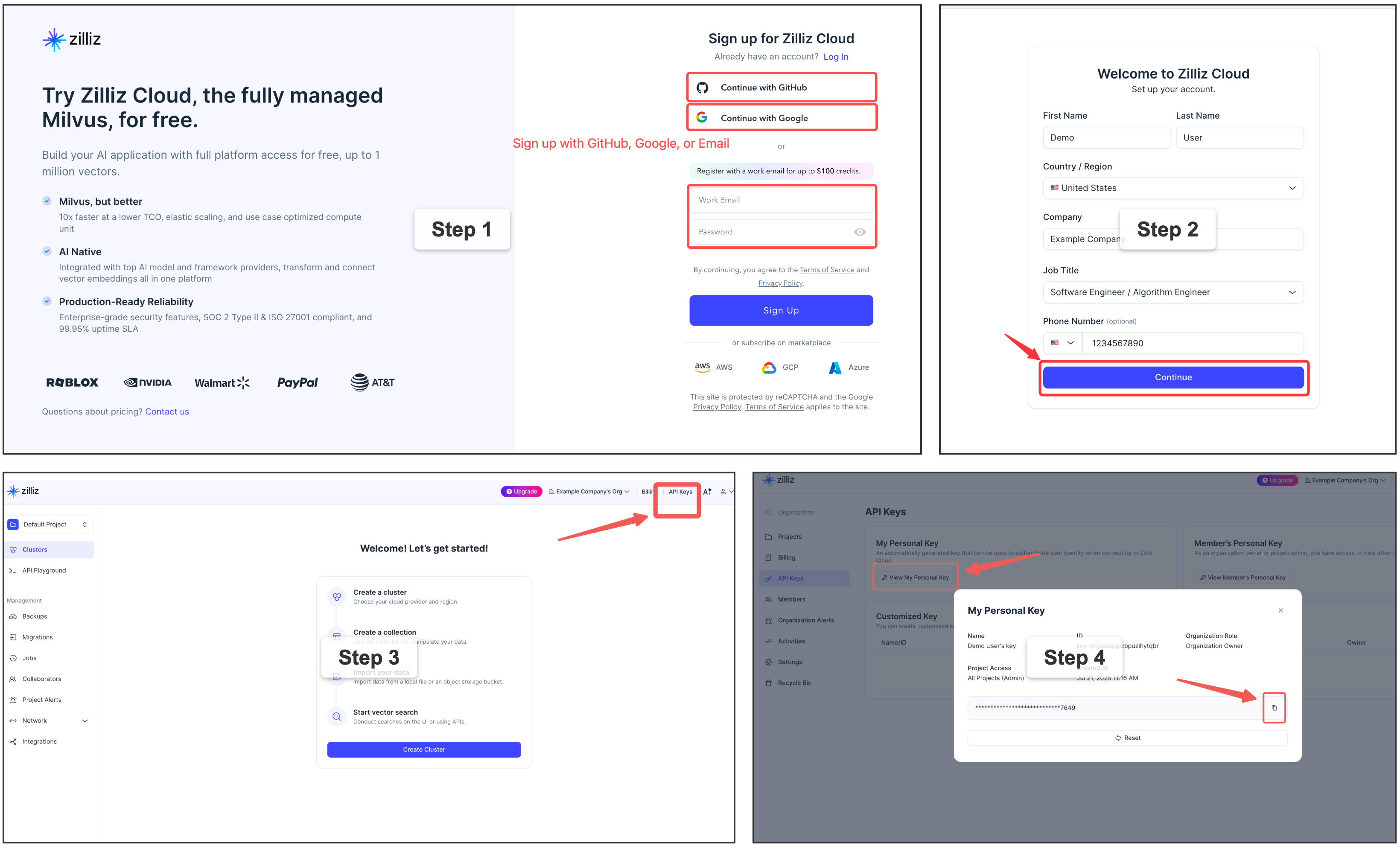
⭐ Zilliz Cloud (recommended) — fully managed, free tier available. No Docker, no ops. Concurrent access and real-time indexing:
memsearch config set milvus.uri "https://in03-xxx.api.gcp-us-west1.zillizcloud.com"
memsearch config set milvus.token "your-api-key"
Sign up for a free Zilliz Cloud cluster
You can sign up on Zilliz Cloud to get a free cluster and API key.
Self-hosted Milvus Server (Docker) — for advanced users
For multi-user or team environments. Requires Docker. See the official installation guide.
View Current Config
Platform-Specific Config
Each plugin may have additional configuration. See: