Getting Started
Installation
Install memsearch with pip (OpenAI embeddings are included by default):
Extras for additional embedding providers
Each optional extra pulls in the provider SDK you need:
$ pip install "memsearch[onnx]"        # ONNX Runtime — bge-m3 int8, CPU, no API key
$ pip install "memsearch[google]"      # Google Gemini embeddings
$ pip install "memsearch[voyage]"      # Voyage AI embeddings
$ pip install "memsearch[jina]"        # Jina AI embeddings
$ pip install "memsearch[mistral]"     # Mistral AI embeddings
$ pip install "memsearch[ollama]"      # Ollama (local, no API key)
$ pip install "memsearch[local]"       # sentence-transformers (local, no API key)
$ pip install "memsearch[anthropic]"   # Anthropic (for compact/summarization LLM)
$ pip install "memsearch[all]"         # Everything above
Zero-config quick start (no API key)
If you want the fastest path to a working local setup, use local embeddings plus the default Milvus Lite backend. This runs entirely on your machine and does not require an API key.
$ mkdir -p quickstart-notes
$ printf '# Notes\n\n- Redis TTL is 15 minutes\n- Staging URL is https://staging.example.com\n' > quickstart-notes/MEMORY.md
$ pip install "memsearch[local]"
import asyncio
from memsearch import MemSearch

async def main():
    mem = MemSearch(
        paths=["./quickstart-notes"],
        embedding_provider="local",
    )
    await mem.index()

    results = await mem.search("what is the Redis TTL?", top_k=3)
    for r in results:
        print(r["content"])

    mem.close()

asyncio.run(main())
Use this path when you want to evaluate memsearch quickly before wiring in OpenAI, Ollama, or a remote Milvus deployment.
How It All Fits Together
The diagram below shows the full lifecycle: writing markdown, indexing chunks, and searching them later.
sequenceDiagram
    participant U as Your App
    participant M as MemSearch
    participant E as Embedding API
    participant V as Milvus

    U->>M: save_memory("Redis config...")
    U->>M: mem.index()
    M->>M: Chunk markdown
    M->>M: SHA-256 dedup
    M->>E: Embed new chunks
    E-->>M: Vectors
    M->>V: Upsert
    U->>M: mem.search("Redis?")
    M->>E: Embed query
    E-->>M: Query vector
    M->>V: Hybrid search (dense + BM25)
    V-->>M: RRF-reranked Top-K matches
    M-->>U: Results with source info
Markdown is the source of truth. The vector store is a derived index -- rebuildable anytime from the original .md files. This means your memory is human-readable, git-friendly, and never locked into a proprietary format.
Your First Memory Search
This section walks through the complete flow: create a memory directory, write some markdown files, index them, and search.
Set up your memory directory
memsearch follows the OpenClaw memory layout: a MEMORY.md file for persistent facts, plus daily logs in a memory/ subdirectory.
Write a MEMORY.md with long-lived facts:
$ cat > MEMORY.md << 'EOF'
# MEMORY.md

## Team
- Alice: frontend lead, React expert
- Bob: backend lead, Python/FastAPI
- Charlie: DevOps, manages Kubernetes

## Architecture Decisions
- ADR-001: Use event-driven architecture with Kafka
- ADR-002: PostgreSQL 16 as primary database
- ADR-003: Redis 7 for caching and sessions
- ADR-004: Milvus for product semantic search
EOF
Write a daily log:
$ cat > memory/2026-02-10.md << 'EOF'
# 2026-02-10

## Standup Notes
- Alice finished the checkout redesign, merging today
- Bob fixed the N+1 query in the order service — response time dropped from 800ms to 120ms
- Charlie set up staging auto-deploy via GitHub Actions

## Decision
We decided to migrate from REST to gRPC for inter-service communication.
The main drivers: type safety, streaming support, and ~40% latency reduction in benchmarks.
EOF
Index with the CLI
Search with the CLI
$ memsearch search "what caching solution are we using?"
--- Result 1 (score: 0.9919) ---
Source: MEMORY.md
Heading: Architecture Decisions
- ADR-003: Redis 7 for caching and sessions

$ memsearch search "what did Bob work on recently?" --top-k 3
--- Result 1 (score: 0.9838) ---
Source: memory/2026-02-10.md
Heading: Standup Notes
- Bob fixed the N+1 query in the order service — response time dropped from 800ms to 120ms
Use --json-output to get structured results for piping into other tools:
Search with the Python API
The same workflow in Python:
import asyncio
from memsearch import MemSearch

async def main():
    mem = MemSearch(paths=["."])
    await mem.index()

    results = await mem.search("what caching solution are we using?", top_k=3)
    for r in results:
        print(f"[{r['score']:.4f}] {r['source']} — {r['heading']}")
        print(f"  {r['content'][:200]}\n")

    mem.close()

asyncio.run(main())
Building an Agent with Memory
The real power of memsearch is giving an LLM agent persistent memory across conversations. The pattern is simple: recall, think, remember.
- Recall -- search past memories for context relevant to the user's question
- Think -- call the LLM with that context injected into the system prompt
- Remember -- save the exchange to a daily markdown log and re-index
OpenAI example (default)
import asyncio
from datetime import date
from pathlib import Path
from openai import OpenAI
from memsearch import MemSearch

MEMORY_DIR = "./memory"
llm = OpenAI()
mem = MemSearch(paths=[MEMORY_DIR])


def save_memory(content: str):
    """Append a note to today's memory log (OpenClaw-style daily markdown)."""
    p = Path(MEMORY_DIR) / f"{date.today()}.md"
    p.parent.mkdir(parents=True, exist_ok=True)
    with open(p, "a") as f:
        if p.stat().st_size == 0:
            f.write(f"# {date.today()}\n")
        f.write(f"\n{content}\n")


async def agent_chat(user_input: str) -> str:
    # 1. Recall — search past memories for relevant context
    memories = await mem.search(user_input, top_k=5)
    context = "\n".join(f"- {m['content'][:300]}" for m in memories)

    # 2. Think — call LLM with memory context
    resp = llm.chat.completions.create(
        model="gpt-5-mini",
        messages=[
            {
                "role": "system",
                "content": (
                    "You are a helpful assistant with access to the user's memory.\n"
                    f"Relevant memories:\n{context}"
                ),
            },
            {"role": "user", "content": user_input},
        ],
    )
    answer = resp.choices[0].message.content

    # 3. Remember — save this exchange and re-index
    save_memory(f"## User: {user_input}\n\n{answer}")
    await mem.index()

    return answer


async def main():
    # Seed some knowledge
    save_memory("## Team\n- Alice: frontend lead\n- Bob: backend lead")
    save_memory("## Decision\nWe chose Redis for caching over Memcached.")
    await mem.index()

    # Agent can now recall those memories
    print(await agent_chat("Who is our frontend lead?"))
    print(await agent_chat("What caching solution did we pick?"))


asyncio.run(main())
Anthropic Claude variant
Install the Anthropic extra:
Then swap the LLM call:
from anthropic import Anthropic

llm = Anthropic()

# In agent_chat(), replace the OpenAI call with:
resp = llm.messages.create(
    model="claude-sonnet-4-6",
    max_tokens=1024,
    system=f"You have these memories:\n{context}",
    messages=[{"role": "user", "content": user_input}],
)
answer = resp.content[0].text
Ollama variant (fully local, no API key)
$ pip install "memsearch[ollama]"
$ ollama pull nomic-embed-text    # embedding model
$ ollama pull llama3.2            # chat model
from ollama import chat
from memsearch import MemSearch

# Use Ollama for embeddings too — everything stays local
mem = MemSearch(paths=[MEMORY_DIR], embedding_provider="ollama")

# In agent_chat(), replace the LLM call with:
resp = chat(
    model="llama3.2",
    messages=[
        {"role": "system", "content": f"You have these memories:\n{context}"},
        {"role": "user", "content": user_input},
    ],
)
answer = resp.message.content
API Keys
Set the environment variable for your chosen embedding provider. memsearch reads standard SDK environment variables -- no custom key names.
| Provider | Env Var | Notes |
|---|---|---|
| OpenAI (default) | OPENAI_API_KEY |
Included with base install |
| ONNX (plugin default) | -- | No API key needed. CPU-only, bge-m3 int8. Requires memsearch[onnx] |
| OpenAI-compatible proxy | OPENAI_BASE_URL |
For Azure OpenAI, vLLM, LiteLLM, etc. |
| Google Gemini | GOOGLE_API_KEY |
Requires memsearch[google] |
| Voyage AI | VOYAGE_API_KEY |
Requires memsearch[voyage] |
| Jina AI | JINA_API_KEY |
Requires memsearch[jina] |
| Mistral AI | MISTRAL_API_KEY |
Requires memsearch[mistral] |
| Ollama | OLLAMA_HOST (optional) |
Defaults to http://localhost:11434 |
| Local (sentence-transformers) | -- | No API key needed |
| Anthropic | ANTHROPIC_API_KEY |
Used by compact summarization only |
$ export OPENAI_API_KEY="sk-..."         # OpenAI embeddings (default)
$ export GOOGLE_API_KEY="..."            # Google Gemini embeddings
$ export VOYAGE_API_KEY="..."            # Voyage AI embeddings
$ export JINA_API_KEY="jina_..."         # Jina AI embeddings
$ export MISTRAL_API_KEY="..."           # Mistral AI embeddings
$ export ANTHROPIC_API_KEY="..."         # Anthropic (for compact summarization)
Milvus Backends
memsearch works with three Milvus deployment modes. Choose based on your needs:
graph TD
    A[memsearch] --> B{Choose backend}
    B -->|"Default<br>(zero config)"| C["Milvus Lite<br>~/.memsearch/milvus.db"]
    B -->|"Self-hosted<br>(multi-agent)"| D["Milvus Server<br>localhost:19530"]
    B -->|"Managed<br>(production)"| E["Zilliz Cloud<br>cloud.zilliz.com"]

    style C fill:#2a3a5c,stroke:#6ba3d6,color:#a8b2c1
    style D fill:#2a3a5c,stroke:#6ba3d6,color:#a8b2c1
    style E fill:#2a3a5c,stroke:#e0976b,color:#a8b2c1
Milvus Lite (default -- zero config)
Data is stored in a single local .db file. No server to install, no ports to open.
Best for: personal use, single-agent setups, prototyping, development.
Native Windows is best-effort
Milvus Lite 3.x provides a Windows-capable foundation, and memsearch selects versions containing the required Windows fixes. This path has not received one-to-one native Windows validation by the memsearch maintainers and is not part of the formal support matrix. Use Milvus Server, Zilliz Cloud, or WSL2 if the local backend fails.
Collection descriptions are best-effort metadata. Some Milvus Lite 3.x versions accept a description during collection creation but return an empty value later. Memsearch does not use description round-trip for indexing or search correctness.
Milvus Server (self-hosted)
Deploy Milvus via Docker or Kubernetes. Multiple agents and users can share the same server instance, each using a separate collection or database.
Best for: team environments, multi-agent workloads, shared always-on vector store.
Zilliz Cloud (fully managed)  Recommended
Zero-ops, auto-scaling managed Milvus. Get a free cluster →
Best for: production deployments, teams that do not want to manage infrastructure, anyone who wants real-time indexing without running Docker.
Sign up for a free Zilliz Cloud cluster 👈
You can sign up on Zilliz Cloud to get a free cluster and API key.
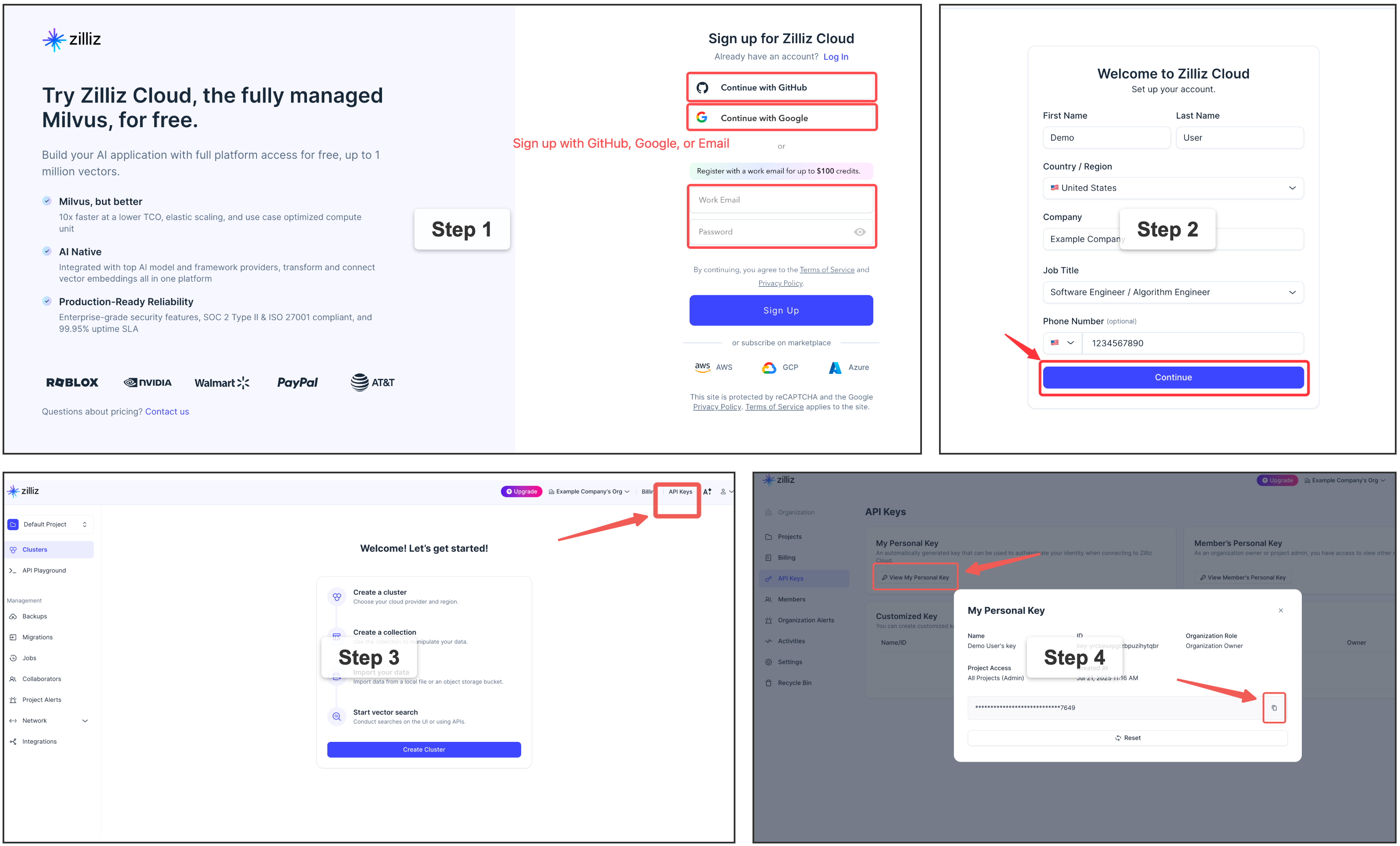
Copy your Personal Key to use as milvus_token in the examples below.
Why Zilliz Cloud?
Zilliz Cloud removes all the operational overhead of running Milvus yourself — no Docker, no port management, no upgrades, no backup scripts. You get a production-ready endpoint in under 2 minutes, with a generous free tier that covers most personal and small-team use cases.
Which backend should I choose?
| Milvus Lite | Milvus Server | Zilliz Cloud | |
|---|---|---|---|
| Setup complexity | Zero config | Docker required | Zero config |
| Concurrent access | |||
Real-time watch indexing |
|||
| Multi-machine / team sharing | Manual networking | Built-in | |
| Ops burden | None | Self-managed | Fully managed |
| Auto-scaling | Manual | Automatic | |
| Free tier | Unlimited (local) | Self-hosted cost | Free cluster |
graph TD
    Q1{"Just trying memsearch<br>or single-user dev?"}
    Q1 -->|Yes| LITE["✅ Milvus Lite<br>(default, zero config)"]
    Q1 -->|No| Q2{"Want to manage<br>your own server?"}
    Q2 -->|Yes| SERVER["✅ Milvus Server<br>(Docker / K8s)"]
    Q2 -->|No| CLOUD["⭐ Zilliz Cloud<br>(recommended)"]

    style CLOUD fill:#1a5276,stroke:#e0976b,color:#f0f0f0
    style LITE fill:#2a3a5c,stroke:#6ba3d6,color:#a8b2c1
    style SERVER fill:#2a3a5c,stroke:#6ba3d6,color:#a8b2c1
Upgrade anytime
Starting with Milvus Lite? You can switch to Zilliz Cloud later by changing a single config value — your data will be re-indexed automatically from the source markdown files.
Configuration
memsearch uses a layered configuration system. Settings are resolved in priority order (lowest to highest):
- Built-in defaults -- sensible out-of-the-box values
- Integration defaults -- for example, a plugin's directory-derived collection
- Global config --
~/.memsearch/config.toml - Project config --
.memsearch.tomlin your working directory - Explicit CLI flags --
--milvus-uri,--provider,--collection, etc.
Higher-priority sources override lower ones. This means you can set defaults globally, customize per project, and override on the fly with CLI flags.
Note: API keys can be configured via environment variables (e.g.
OPENAI_API_KEY) or in config files using theenv:reference syntax (e.g.api_key = "env:MY_API_KEY"). See API Keys and Environment Variable References below.
Interactive config wizard
The fastest way to configure memsearch:
$ memsearch config init
memsearch configuration wizard
Writing to: /home/user/.memsearch/config.toml

── Milvus ──
  Milvus URI [~/.memsearch/milvus.db]:
  Milvus token (empty for none) []:
  Collection name [memsearch_chunks]:

── Embedding ──
  Provider (openai/google/voyage/jina/mistral/ollama/local/onnx) [openai]:
  Model (empty for provider default) []:

── Chunking ──
  Max chunk size (chars) [1500]:
  Overlap lines [2]:
...

Config saved to /home/user/.memsearch/config.toml
Use --project to write allowlisted local indexing overrides to
.memsearch.toml in the current directory:
Config file locations
| Scope | Path | Use case |
|---|---|---|
| Global | ~/.memsearch/config.toml |
Machine-wide defaults (Milvus URI, preferred provider) |
| Project | .memsearch.toml |
Low-risk local indexing overrides (collection name, batch size, chunking, ignore rules, watch debounce) |
Both files use TOML format:
# Example ~/.memsearch/config.toml

[milvus]
uri = "http://localhost:19530"
token = "root:Milvus"
collection = "memsearch_chunks"

[embedding]
provider = "openai"
model = ""
base_url = ""
api_key = ""

[chunking]
max_chunk_size = 1500
overlap_lines = 2

[watch]
debounce_ms = 1500

[compact]                    # deprecated — use [llm] + [prompts] instead
llm_provider = "openai"
llm_model = ""
prompt_file = ""

[llm]                        # LLM settings for memsearch compact
provider = ""                # empty = compact defaults to openai
model = ""

[llm.providers.openai]        # optional named providers for plugin summarization
type = "openai"               # openai/openai-compatible/anthropic/gemini
model = "gpt-5-mini"
base_url = ""
api_key = "env:OPENAI_API_KEY"

[plugins.claude-code.summarize] # optional plugin-specific summarize routing
provider = ""                 # empty/native = Claude Code native summarizer
model = ""                    # native model override, or API provider model override

[plugins.codex.summarize]
provider = ""                 # empty/native = Codex native summarizer
model = ""                    # empty = Codex plugin default

[plugins.opencode.summarize]
provider = ""                 # empty/native = OpenCode native summarizer
model = ""                    # empty = OpenCode small_model/default behavior

[plugins.openclaw.summarize]
provider = ""                 # empty/native = OpenClaw native summarizer
model = ""                    # empty = OpenClaw default agent model

[prompts]                    # custom prompt template files
compact = ""                 # for memsearch compact
summarize = ""               # for plugin session summarization
project_review = ""          # for plugin PROJECT.md maintenance
user_profile = ""            # for plugin USER.md maintenance
Environment variable references
Any string value in the config file can reference an environment variable using the env: prefix. This lets you keep secrets out of config files while still configuring them per-project:
# .memsearch.toml
[embedding]
provider = "openai"
base_url = "https://my-azure.openai.azure.com"
api_key = "env:AZURE_OPENAI_API_KEY"       # resolved from $AZURE_OPENAI_API_KEY at runtime

[milvus]
token = "env:MILVUS_TOKEN"                 # works for any string field
If the referenced environment variable is not set, memsearch raises an error at startup with a clear message. Plain string values (without the env: prefix) are used as-is.
Custom OpenAI-compatible endpoints
The embedding.base_url and embedding.api_key fields allow using any OpenAI-compatible embedding API (Azure OpenAI, vLLM, LiteLLM, SiliconFlow, NVIDIA, etc.):
# .memsearch.toml — Azure OpenAI example
[embedding]
provider = "openai"
model = "text-embedding-3-small"
base_url = "https://my-resource.openai.azure.com"
api_key = "env:AZURE_OPENAI_API_KEY"
# ~/.memsearch/config.toml — local vLLM example
[embedding]
provider = "openai"
model = "BAAI/bge-small-en-v1.5"
base_url = "http://localhost:8000/v1"
api_key = "dummy"
These trusted settings belong in global config. They can also be passed via CLI
flags (--base-url, --api-key) or the Python API (embedding_base_url,
embedding_api_key).
Get and set individual values
$ memsearch config set milvus.uri http://localhost:19530
Set milvus.uri = http://localhost:19530 in /home/user/.memsearch/config.toml

$ memsearch config get milvus.uri
http://localhost:19530

$ memsearch config set embedding.batch_size 32 --project
Set embedding.batch_size = 32 in .memsearch.toml
View resolved configuration
$ memsearch config list --resolved    # Final merged config from all sources
$ memsearch config list --global      # Show ~/.memsearch/config.toml only
$ memsearch config list --project     # Show .memsearch.toml only
CLI flag overrides
Explicit CLI flags always take the highest priority. The
--default-collection integration flag is the exception: it is a fallback
below global and project config, so plugins do not mask configured collections.
$ memsearch index ./memory/ --provider google --milvus-uri http://localhost:19530
$ memsearch search "Redis config" --top-k 10 --milvus-uri http://10.0.0.5:19530
Multi-Developer Workflows
In a typical multi-developer workflow, each person clones the repo locally and runs their own agent sessions. The plugin stores memory in .memsearch/memory/YYYY-MM-DD.md files -- these are personal session logs generated from each developer's own conversations. They are local by nature and do not need to be pushed to the shared remote.
| What | Scope | Version-controlled? | Example |
|---|---|---|---|
| Project conventions | Shared across team | Yes -- commit to git | CLAUDE.md (coding standards, architecture decisions, team agreements) |
| Session memories | Personal to each developer | No -- add to .gitignore |
.memsearch/memory/2026-02-10.md (what you worked on today) |
Why this works:
- No merge conflicts. Each developer's memory files only exist on their own machine. There is nothing to merge.
- No noise. Your colleagues don't need to know that you spent 45 minutes debugging a typo. Your session logs are yours.
- Shared knowledge goes in
CLAUDE.md. Decisions that the whole team should know about (e.g., "we use Redis for caching", "never useSELECT *") belong inCLAUDE.mdor a shared docs directory -- version-controlled, reviewed via PR, the normal git workflow.
If your team does want to share certain memories (e.g., onboarding notes, architecture decisions), you can put those in a shared directory that is tracked by git, and keep personal session logs in .memsearch/ which is gitignored. memsearch can index multiple paths:
What's Next
Now that you have a working setup, pick the next page based on what you're trying to do:
- FAQ -- common questions about Windows, reset/rebuild flows, and dimension mismatch
- Troubleshooting -- operational recovery steps when search, indexing, or embeddings behave unexpectedly
- CLI Reference -- complete reference for all
memsearchcommands, flags, and options - Python API -- build custom agent integrations
- Integrations -- plug memsearch into LangChain, LangGraph, LlamaIndex, and CrewAI
- Architecture -- deep dive into the chunking pipeline, dedup strategy, and data flow diagrams
- Design Philosophy -- why markdown, why Milvus, comparison with competitors
- Claude Code Plugin -- install memsearch for Claude Code
- Platform Comparison -- compare all supported platforms
- Python API -- build custom agent integrations