Configuration
memsearch uses a layered TOML config system. Most users don't need to configure anything — the defaults work out of the box.
Config Sources (priority low → high)
- Built-in defaults
- Integration defaults such as a plugin's directory-derived collection
~/.memsearch/config.toml— global defaults<project>/.memsearch.toml— project-level overrides- Explicit CLI flags or Python call arguments — highest priority
Plugins pass their derived collection through --default-collection, so an
explicit [milvus].collection in the project config overrides the derived
name, and an explicit global collection overrides it when the project does not
set one. An explicit --collection remains highest priority.
The current Claude Code, Codex, OpenCode, OpenClaw, and DSH plugins require a
memsearch core that exposes --default-collection. If that capability is not
available, the plugin reports an incompatibility before running collection
data operations; upgrade the core and plugin together. Existing CLI commands
that do not use this integration-only flag remain unchanged.
By default, ordinary repositories and linked Git worktrees use different
directory-derived collections. To share indexed memory, set the same
[milvus].collection value explicitly in each project's .memsearch.toml (or
in global config when all projects should share it). Memsearch does not merge
worktree scopes or migrate previously derived collections automatically.
Since v0.4.11, project-level .memsearch.toml is intentionally restricted
before it is merged. It can only set low-risk local indexing keys:
milvus.collection, embedding.batch_size, chunking.max_chunk_size,
chunking.overlap_lines, indexing.ignore_files, indexing.exclude, and
watch.debounce_ms. Put trusted settings such as provider routing, API
endpoints, API keys, prompt files, and plugins.* automation in global config
or pass them as explicit CLI flags.
Quick Setup
# Interactive config wizard
memsearch config init

# Or set individual values
memsearch config set embedding.provider onnx
memsearch config set milvus.uri http://localhost:19530
Optional remote reranking
Reranking is off by default (reranker.model = ""). Enable Jev explicitly in
your trusted global configuration:
The equivalent setting in ~/.memsearch/config.toml is:
jev-latest follows the latest stable release, matching the official SDK default. To keep a specific version, use jev:jev-1.13.0 instead. The published evaluation remains pinned to that version.
This sends search queries and retrieved chunk text to the TypeSafe API. It does not change the embedding provider or require reindexing. Project-local config cannot enable this remote provider. To disable reranking:
Local cross-encoder model IDs continue to use the existing ONNX/PyTorch backends. See reranking evaluation for results and Python API for programmatic use.
Index Exclusions
Ignore support is explicit so upgrades do not silently change an existing
user's index. If [indexing] is absent, or both lists are empty, memsearch keeps
the previous scan-all behavior. memsearch config init writes this opt-in
default into newly generated config files:
Each directory passed to memsearch index or memsearch watch is an independent
index root. Ignore files are discovered in that root and its subdirectories;
memsearch never searches parent directories. For example, indexing
project/.memsearch/memory/ does not read project/.gitignore, while
project/.memsearch/memory/.gitignore does apply.
All rules use gitignore-compatible syntax. Add other tools' ignore filenames or direct patterns without enabling tool-specific behavior in memsearch:
[indexing]
ignore_files = [".gitignore", ".cursorignore", ".cursorindexingignore"]
exclude = ["generated/**", "*.draft.md"]
The same matcher is used by initial indexing and live watch events. Explicit
file arguments, such as memsearch index ignored.md, remain explicit partial
updates and bypass directory ignore discovery. After adding a new exclusion,
run a full directory index once to remove previously indexed chunks that now
match it.
For a one-off run, repeat --ignore-file or --exclude as needed:
memsearch index . --ignore-file .gitignore --ignore-file .cursorignore
memsearch index docs/ --exclude 'generated/**' --exclude '*.draft.md'
Embedding Provider
| Provider | Install | API Key | Notes |
|---|---|---|---|
| onnx (default) | pip install memsearch[onnx] |
No | Local, free, ~100MB model download |
| openai | pip install memsearch[openai] |
OPENAI_API_KEY |
Best quality |
pip install memsearch[google] |
GOOGLE_API_KEY |
Gemini embeddings | |
| voyage | pip install memsearch[voyage] |
VOYAGE_API_KEY |
High quality |
| jina | pip install memsearch[jina] |
JINA_API_KEY |
jina-embeddings-v4, multilingual, long context |
| mistral | pip install memsearch[mistral] |
MISTRAL_API_KEY |
EU-based, GDPR-friendly |
| ollama | pip install memsearch[ollama] |
No | Local, any model |
# Switch provider
memsearch config set embedding.provider openai
memsearch index --force   # re-index with new provider
Milvus Backend
| Backend | Config | Notes |
|---|---|---|
| Milvus Lite (default) — zero config, single file. Great for getting started: |
⭐ Zilliz Cloud (recommended) — fully managed, free tier available. No Docker, no ops. Concurrent access and real-time indexing:
memsearch config set milvus.uri "https://in03-xxx.api.gcp-us-west1.zillizcloud.com"
memsearch config set milvus.token "your-api-key"
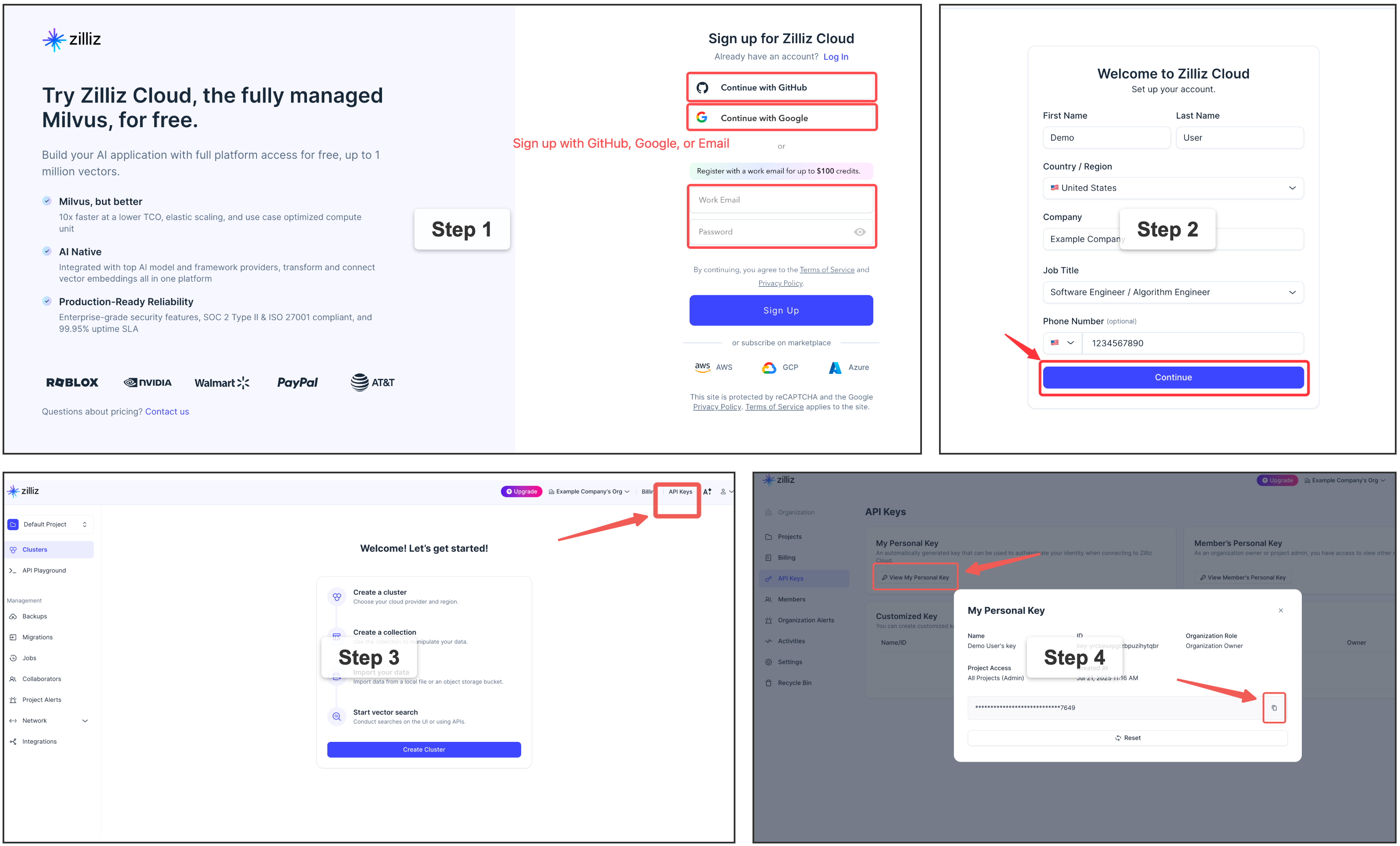
Sign up for a free Zilliz Cloud cluster
You can sign up on Zilliz Cloud to get a free cluster and API key.
Self-hosted Milvus Server (Docker) — for advanced users
For multi-user or team environments. Requires Docker. See the official installation guide.
View Current Config
Plugin Summarization Routing
Plugins keep their existing native/default summarizer unless you set a
platform-specific override. These settings do not fall back to llm.model.
memsearch config set plugins.claude-code.summarize.model haiku
memsearch config set plugins.codex.summarize.model gpt-5.1-codex-mini
memsearch config set plugins.opencode.summarize.model anthropic/claude-haiku
memsearch config set plugins.openclaw.summarize.model qwen3-coder
To route plugin summarization through a memsearch-managed API provider, define a named provider and point a plugin at it:
memsearch config set llm.providers.openai.type openai
memsearch config set llm.providers.openai.model gpt-5-mini
memsearch config set llm.providers.openai.api_key env:OPENAI_API_KEY
memsearch config set plugins.codex.summarize.provider openai
Set plugins.<platform>.summarize.provider to native, or leave it empty, to
preserve the current plugin behavior.
You can disable automatic capture for a platform globally while keeping the plugin installed:
Advanced Plugin Maintenance
Plugins can optionally maintain higher-level markdown files in the background. This is disabled by default.
| Task | Default output | Purpose |
|---|---|---|
project_review |
.memsearch/PROJECT.md |
Durable project state: active threads, decisions, risks, next steps |
user_profile |
.memsearch/USER.md |
Reusable user preferences, working style, recurring goals, background context |
Example global setup for Codex:
memsearch config set plugins.codex.project_review.enabled true
memsearch config set plugins.codex.project_review.provider native
memsearch config set plugins.codex.project_review.min_interval_hours 24
memsearch config set plugins.codex.project_review.input_dir .memsearch/memory
memsearch config set plugins.codex.project_review.output_file .memsearch/PROJECT.md

memsearch config set plugins.codex.user_profile.enabled true
memsearch config set plugins.codex.user_profile.provider native
memsearch config set plugins.codex.user_profile.output_file .memsearch/USER.md
Equivalent TOML in ~/.memsearch/config.toml:
[plugins.codex.summarize]
enabled = true
provider = ""  # empty/native keeps the plugin-native summarizer
model = ""

[plugins.codex.project_review]
enabled = true
provider = "native"
model = ""
min_interval_hours = 24
input_dir = ".memsearch/memory"
output_file = ".memsearch/PROJECT.md"

[plugins.codex.user_profile]
enabled = true
provider = "native"
model = ""
min_interval_hours = 24
input_dir = ".memsearch/memory"
output_file = ".memsearch/USER.md"
input_dir and output_file can be relative or absolute. Relative paths are
resolved from the current project directory. The default input is the daily
memory journal directory.
Maintenance tasks run when the plugin wakes them and all of these are true:
- the task is enabled
- the input markdown digest changed
min_interval_hourshas elapsed since the last successful run
Maintenance state is stored in .memsearch/.maintenance-state.json. If a
background task fails, the matching <platform>.<task> entry records
last_action = "error", last_failed_at, last_error, and
failed_input_digest. Failed input is not marked as the last successful digest,
so the task can retry on the next due run instead of going permanently quiet.
Set provider = "native" to reuse the agent's own non-interactive model path.
To use a memsearch-managed API provider instead, define a named provider and
reference it from the task:
memsearch config set llm.providers.openai.type openai
memsearch config set llm.providers.openai.model gpt-5-mini
memsearch config set llm.providers.openai.api_key env:OPENAI_API_KEY
memsearch config set plugins.codex.project_review.provider openai
Custom maintenance prompts are configured globally. Prefer absolute paths for shared prompt files:
memsearch config set prompts.project_review /path/to/project-review.txt
memsearch config set prompts.user_profile /path/to/user-profile.txt
The plugin-installed memory-config skill can inspect current config, memory
files, and index health; explain these settings; and choose global vs project
scope from natural-language requests.
Skills from Memory (procedural memory)
A third maintenance task, memory_to_skill, distills recurring workflows into
reusable agent skills. See Skills from Memory for
what it does and the design behind it; this is the configuration reference.
You normally turn it on by asking your agent (it edits the config via the
memory-config skill). The keys below are for reference and for editing the file
directly. The enabled flag gates only the background mining pass (disabled by
default, to avoid surprise background model calls) — on-demand capture and mining
via the /memory-to-skill skill run in the live agent and work regardless. It
shares the maintenance tasks' provider/model routing, prompt override
(prompts.memory_to_skill), input_dir, and min_interval_hours cadence.
memsearch config set plugins.codex.memory_to_skill.enabled true
memsearch config set plugins.codex.memory_to_skill.min_occurrences 3   # default 3; lower = more eager
memsearch config set plugins.codex.memory_to_skill.paths '[".agents/skills"]'   # optional; empty = asked at install
Since v0.4.11, project-local .memsearch.toml accepts only allowlisted local
indexing keys. Keep plugins.* settings such as memory_to_skill.* in global
config; do not set them with --project.
| Field | Default | Meaning |
|---|---|---|
enabled |
false |
Turn background distillation on |
min_occurrences |
3 |
How many times a workflow must recur before it is distilled |
min_interval_hours |
24 |
Minimum gap between background runs |
provider / model |
native |
Same routing as the maintenance tasks |
paths |
(empty) | Where installed skills are copied; empty = asked at install time |
The same maintenance state file records memory_to_skill failures under
<platform>.memory_to_skill.last_error, which is the first place to check if
background distillation is enabled but no candidates appear.
Platform-Specific Config
Each plugin may have additional configuration. See: